---
title: Connecting Instagram, Twitter (X), Google, Microsoft, and Dropbox to Kitcast
description: Learn how to easily connect your Instagram, Twitter (X), Google, Microsoft, and Dropbox accounts to Kitcast for enhanced social media content playback on your digital signage.
---
[Skip to content](https://knowledgebase.kitcast.tv/connecting-instagram-twitter-x-google-microsoft-and-dropbox-to-kitcast#main-content)
English
Show submenu for translations
Open main navigation
Close main navigation
- English
Show submenu for translations
How can we help you today?
- There are no suggestions because the search field is empty.
1. [Kitcast v.2](https://knowledgebase.kitcast.tv/?hsLang=en)
2. [Frequently Asked Questions](https://knowledgebase.kitcast.tv/frequently-asked-questions?hsLang=en)
3. [Additional Functionality](https://knowledgebase.kitcast.tv/frequently-asked-questions?hsLang=en#additional-functionality)
# Connecting Instagram, Twitter (X), Google, Microsoft, and Dropbox to Kitcast
## Connecting your social media accounts to Kitcast allows you to use social widgets for social widgets playback., enhancing your content.
### **Here's how to connect your accounts:**
1. **Access the Dashboard**: Log in to your Kitcast dashboard and navigate to the **Connected Accounts** tab.
2. **Add an Account**: Click on the **+Add Account** button, then select the account type you wish to connect from the dropdown. You can choose from:
- Instagram
- Twitter (X)
- Google
- Microsoft
- Dropbox
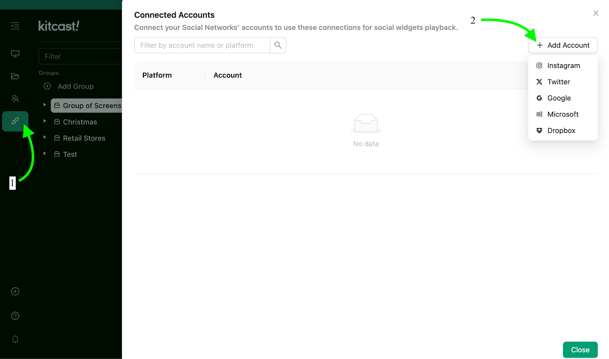
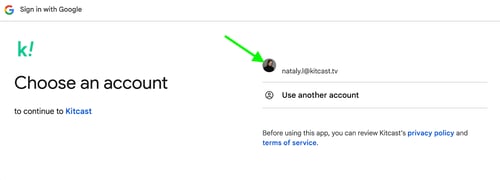
**3. Sign In**: After selecting your desired account, you’ll be redirected to the login page of the respective platform. For example, if you chose Google, you’ll be prompted to sign in with your Google account.
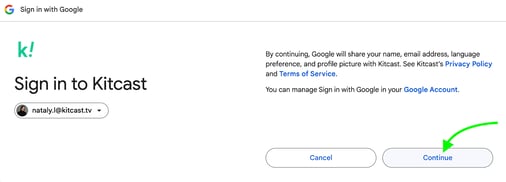
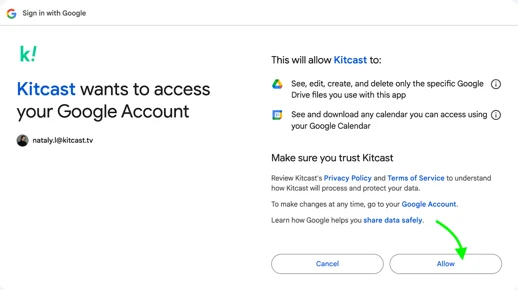
**4. Grant Permissions**: Once logged in, you’ll need to accept Kitcast’s Privacy Policy and Term and Conditions. Click **Continue**, then press **Allow** to give Kitcast permission to access your data.
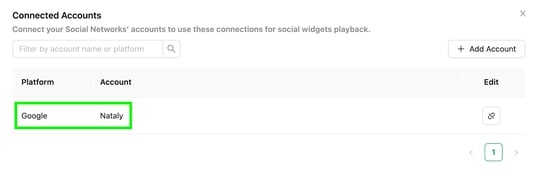
**5. Confirmation**: After completing these steps, the account will be successfully linked to Kitcast, and you’ll be able to see it listed in the **Connected Accounts** tab:
### **Disconnecting an Account:**
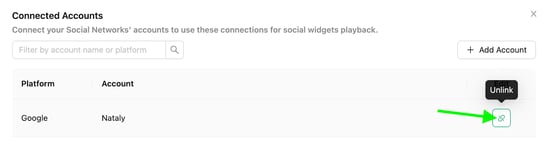
If you no longer wish to use a connected account, you can easily disconnect it by clicking the **Unlink** option next to the account. This will remove the account from your Kitcast setup.
**FAQs About Unlinking Accounts**
- **Can an account owner unlink accounts linked by admins or managers?**Yes, an account owner has the ability to unlink accounts that were connected by admins and managers, which can be helpful for maintaining consistency or updating accounts no longer in use.
- **Can admins unlink accounts of managers?**Admins can unlink accounts connected by managers.
- **What about managers?**Managers are limited to unlinking only the accounts they have personally linked. They do not have permission to unlink other users' accounts.
By following these steps, you'll seamlessly integrate your social media accounts with Kitcast, enabling you to display social content effortlessly on your digital signage.
- [Getting Started with Kitcast](https://knowledgebase.kitcast.tv/getting-started-with-kitcast?hsLang=en)
- [Kitcast AI](https://knowledgebase.kitcast.tv/kitcast-ai?hsLang=en)
- [Kitcast API](https://knowledgebase.kitcast.tv/kitcast-api?hsLang=en)
- [Features & Functionality](https://knowledgebase.kitcast.tv/features-functionality?hsLang=en#main-content)
- [Content Management](https://knowledgebase.kitcast.tv/features-functionality?hsLang=en#content-management)
- [Widgets](https://knowledgebase.kitcast.tv/features-functionality?hsLang=en#widgets)
- [Screen Management](https://knowledgebase.kitcast.tv/features-functionality?hsLang=en#screen-management)
- [Account Management](https://knowledgebase.kitcast.tv/account-management?hsLang=en#main-content)
- [Subscription & Billing](https://knowledgebase.kitcast.tv/account-management?hsLang=en#subscription-billing)
- [Profile & Security Settings](https://knowledgebase.kitcast.tv/account-management?hsLang=en#profile-security-settings)
- [Troubleshooting & Technical Support](https://knowledgebase.kitcast.tv/troubleshooting-technical-support?hsLang=en)
- [Device Configuration: Kitcast Deployment through MDM](https://knowledgebase.kitcast.tv/device-configuration-kitcast-deployment-through-mdm?hsLang=en)
- [Frequently Asked Questions](https://knowledgebase.kitcast.tv/frequently-asked-questions?hsLang=en#main-content)
- [General FAQs](https://knowledgebase.kitcast.tv/frequently-asked-questions?hsLang=en#general-faqs)
- [Additional Functionality](https://knowledgebase.kitcast.tv/frequently-asked-questions?hsLang=en#additional-functionality)
- [Legal](https://knowledgebase.kitcast.tv/legal?hsLang=en)
[](https://kitcast.tv)
© 2026 Kitcast. All rights reserved.
[mailto:support@kitcast.tv](mailto:support@kitcast.tv)
[Terms and Conditions](https://knowledgebase.kitcast.tv/end-user-license-agreement-terms-and-conditions?hsLang=en)
[Privacy Policy](https://knowledgebase.kitcast.tv/privacy-policy?hsLang=en)