---
title: How to Restart the Kitcast App on Your Apple TV
description: Learn how to easily restart the Kitcast app on your Apple TV to fix minor glitches. Follow these simple steps to force quit and reopen the app for smooth performance.
---
[Skip to content](https://knowledgebase.kitcast.tv/how-to-restart-kitcast-app-on-your-apple-tv#main-content)
English
Show submenu for translations
Open main navigation
Close main navigation
- English
Show submenu for translations
How can we help you today?
- There are no suggestions because the search field is empty.
1. [Kitcast v.2](https://knowledgebase.kitcast.tv/?hsLang=en)
2. [Troubleshooting & Technical Support](https://knowledgebase.kitcast.tv/troubleshooting-technical-support?hsLang=en)
# How to Restart the Kitcast App on Your Apple TV
## If you’re experiencing issues with the Kitcast app on your Apple TV, instead of rebooting your entire Apple TV, you can easily force quit the Kitcast app and restart it. This can resolve minor glitches and get your app running smoothly again. Follow the steps below to force quit and restart the Kitcast app on your Apple TV:
### **1. Access the App Switcher**
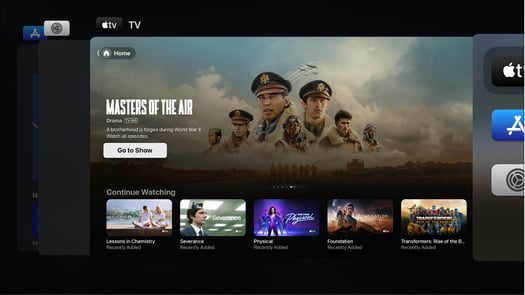
To begin, double-tap the **Home button ** on your Apple TV remote. This will open the **app switcher** screen, where you can view all the apps currently running on your Apple TV.
### **2. Find the Kitcast App**
In the app switcher, use your remote’s **trackpad** to swipe left or right until you find the Kitcast app. If Kitcast is the active app on your screen, it should be centered for easy access.
### **3. Force Quit the App**
Once the Kitcast app is selected, swipe **up** on the remote’s trackpad. This will force the app to close completely. You'll see the app preview slide off the screen, indicating that the app has been closed.
### **4. Restart the Kitcast App**
After closing the app, return to the **Home screen** and navigate to the Kitcast app. Simply click on the app icon to reopen it and continue using it as usual.
### **When Should You Restart the Kitcast App?**
If the Kitcast app is not displaying content properly, or acting unusually, restarting the app can help resolve these issues. It’s a quick and easy way to get the app back to normal.
If the problem persists after restarting the app, feel free to reach out to our support team at [support@kitcast.tv](mailto:support@kitcast.tv) for further assistance.
- [Getting Started with Kitcast](https://knowledgebase.kitcast.tv/getting-started-with-kitcast?hsLang=en)
- [Kitcast AI](https://knowledgebase.kitcast.tv/kitcast-ai?hsLang=en)
- [Kitcast API](https://knowledgebase.kitcast.tv/kitcast-api?hsLang=en)
- [Features & Functionality](https://knowledgebase.kitcast.tv/features-functionality?hsLang=en#main-content)
- [Content Management](https://knowledgebase.kitcast.tv/features-functionality?hsLang=en#content-management)
- [Widgets](https://knowledgebase.kitcast.tv/features-functionality?hsLang=en#widgets)
- [Screen Management](https://knowledgebase.kitcast.tv/features-functionality?hsLang=en#screen-management)
- [Account Management](https://knowledgebase.kitcast.tv/account-management?hsLang=en#main-content)
- [Subscription & Billing](https://knowledgebase.kitcast.tv/account-management?hsLang=en#subscription-billing)
- [Profile & Security Settings](https://knowledgebase.kitcast.tv/account-management?hsLang=en#profile-security-settings)
- [Troubleshooting & Technical Support](https://knowledgebase.kitcast.tv/troubleshooting-technical-support?hsLang=en)
- [Device Configuration: Kitcast Deployment through MDM](https://knowledgebase.kitcast.tv/device-configuration-kitcast-deployment-through-mdm?hsLang=en)
- [Frequently Asked Questions](https://knowledgebase.kitcast.tv/frequently-asked-questions?hsLang=en#main-content)
- [General FAQs](https://knowledgebase.kitcast.tv/frequently-asked-questions?hsLang=en#general-faqs)
- [Additional Functionality](https://knowledgebase.kitcast.tv/frequently-asked-questions?hsLang=en#additional-functionality)
- [Legal](https://knowledgebase.kitcast.tv/legal?hsLang=en)
[](https://kitcast.tv)
© 2026 Kitcast. All rights reserved.
[mailto:support@kitcast.tv](mailto:support@kitcast.tv)
[Terms and Conditions](https://knowledgebase.kitcast.tv/end-user-license-agreement-terms-and-conditions?hsLang=en)
[Privacy Policy](https://knowledgebase.kitcast.tv/privacy-policy?hsLang=en)